10 Simple Ways to Build Trust Through Your Website
TL;DR: A trustworthy website feels clear, legitimate and well maintained. Use your own secure domain, make it obvious who you are and what you offer, keep the design consistent, show real evidence of your expertise, and remove anything that creates confusion or friction.
You don’t need a fancy website. You need one that gives people the confidence to take the next step.
Table of Contents:
 Foundation
- Use your own domain and make sure your site is secure
- Choose fonts and colors that fit the impression you want to make
- Make it easy to take the next step
 Building
- Use visual hierarchy to show visitors what matters most
- Give things room to breathe
- Add proof that other people trust you
 Before You Publish
- Check how it looks and works on devices of different sizes
- Let your eyes go unfocused. What impression do you get?
- Test all links, and test regularly
- Check for accessibility
The Keys to Credibility
Building your own website can get intimidating fast.
Spend ten minutes looking for inspiration and you’ll find brands with cinematic video, elaborate animations, custom illustrations and websites that appear to have been designed by NASA.
Good news: you probably don’t need any of that.
If you’re a therapist, private physician, nonprofit, consultant, or mission-driven small business, your website has a much simpler job.
It needs to make people think:
Yep. This person or organization knows what they’re doing. I’d feel comfortable taking the next step.
That might mean booking an appointment. Making a donation. Filling out an inquiry form. Or taking the time to learn more.
That’s trust.
And you don’t build it with flashy effects. You build it through dozens of small signals that make your website feel clear, credible, considered, and legitimate.
I’ve grouped 10 important rules into three stages:
Foundation — the basic things that need to be in place before anything else.
Building — the design, content and credibility choices that shape how trustworthy your website feels.
Before you publish — the final checks that catch the little things capable of undermining all your hard work.
You don’t need to get fancy. But you do need to get these things right.
Foundation
1. Use your own domain and make sure your site is secure
Domain names
Your domain name is your website’s address on the internet. It’s what someone types into their browser to visit your site directly or what they click when they find you through a search engine or AI chat.
Ideally, you want a domain name that is:
- Obviously connected to your brand
- Easy to remember and type
- Easy to understand when read or said out loud
- Clean, clear, and professional
- Free of accidental slang, acronyms, or unfortunate double meanings (things can get weird when you smush words together)
Most website builders will give you a free subdomain, which is essentially a little piece of real estate on their domain. That can look like:
- www.seriousdoc.wixsite.com
- www.importantevent.showit.site
- www.bookavisit.as.me
- www.mygoodopinions.wordpress.com
There’s nothing inherently wrong with using one of these, especially when you’re just getting started. But if you’re asking people to trust you with their money, time, health, business, or personal information, a free subdomain can make your website feel temporary or less established.
A custom domain gives you a much more professional home online.
You can register one through a domain registrar of your choosing. Popular options include Cloudflare, Namecheap, GoDaddy, and Hostinger.
Once you have your domain, you can connect it to whichever website builder or hosting platform you use. Most platforms will walk you through the process under a setting called something like “custom domain.”
SSL certificates
At first glance, these two URLs look almost identical:
But that extra s matters.
When a website uses https, the connection between the visitor and the website is encrypted. In simple terms, information being sent back and forth is much harder for an unauthorized third party to intercept and read.
When the s is missing, that secure connection isn’t in place.
As a website owner, you want your site to use HTTPS. That happens when your website has a valid SSL certificate.
Fortunately, most modern website builders and hosting companies now handle this for you, either automatically or through a simple setting. Your job is to make sure it’s enabled and that visitors are always directed to the secure https version of your site.
Why does this matter?
- It helps protect your visitors’ privacy.
- If your site isn’t set up securely, modern browsers may show a warning like the one below.
Even if your business is completely legitimate, a big “Your connection is not private” message is not exactly the warm welcome you were hoping for.
And once someone starts wondering whether your website is safe, you’ve already lost trust.
2. Choose Fonts and Colors that Fit the Impression You Want to Make
Okay, that first rule was pretty technical. Fortunately, the remaining rules are a lot less wonky. You can unclench now.
This one goes beyond website design. It’s really about brand design.
Your brand is about perception: the impression people form when they encounter your business, and the expectations they bring with them.
That impression is shaped by lots of small decisions: your logo, colors, fonts, photography, and more.
None of those things works in isolation. Together, they create a visual language that tells people something about who you are before they’ve read a word.
When done well, your visual language reinforces the story you’re telling. Done poorly, that story can become muddled, contradictory, or harder to trust.
 Lightbulb Moment
It’s tempting to choose the colors, fonts, icons, and images you’re naturally drawn to. But if those choices feel out of step with what people expect from your kind of business, you can lose their confidence before they’ve even had a chance to get to know you.
And that’d be a shame. You’re great.
So before you choose fonts and colors, ask yourself:
How do I want people to feel when they visit my website?
Do you want them to feel:
- Energized
- Reassured
- Relaxed
- Serious
- Playful
- Optimistic
- Inspired
- Calm
Or something else entirely?
Once you know the answer, it becomes much easier to make design choices that support that impression.
And when those choices are working, you often don’t notice them much at all. The site just feels coherent.
When they’re not working, though, the mismatch can be surprisingly distracting:
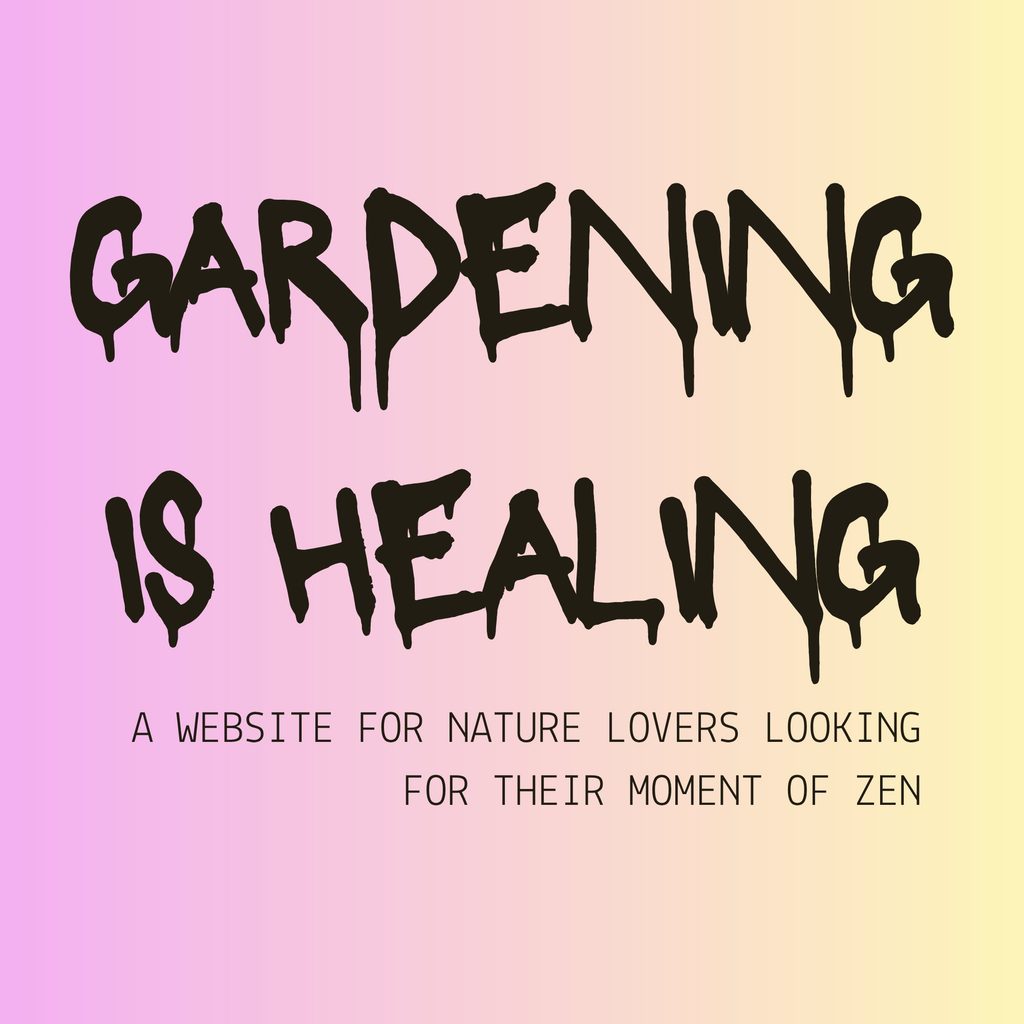

The point isn’t that there’s one “correct” font or color for your industry.
It’s that your visual choices should support the kind of trust you’re asking people to place in you.
3. Make it easy to take the next step
You want your website to be pretty. But much more than that, you want it to convince people to do something.
Maybe that’s booking an appointment, making a donation, registering for an event, or requesting a consultation.
The most important thing is that you know what you want people to do. Then you can make it easy for them.
A good website does not hide next steps like Easter eggs. If someone has to hunt around for your contact information, wonder whether you are accepting new clients, or guess how to buy the thing you are selling, there is a good chance they will give up.
That does not mean every page needs to scream “BUY NOW!” In fact, that would be a major turnoff.
But every page should offer a clear path forward.
Use plain language, put your main action somewhere visible, and make it clear what matters most.
Building
4. Use visual hierarchy to show visitors what matters most
Visual hierarchy is a design-y phrase for a pretty simple idea: help people notice the important things first.
Not every word on a page deserves the same amount of attention. Your page title should stand out more than the paragraph below it. A button should look more clickable than a regular sentence. The most important information should not be hidden in tiny gray text at the bottom of the page.
You can create hierarchy with size, color, spacing, placement, contrast, and font weight. A large heading near the top of the page tells people, “Start here.” A well-placed button tells them, “This is what you can do next.”
When everything is big, bold, colorful, moving, or underlined, nothing stands out. It is like trying to have six people give you directions at the same time.
As you build each page, ask yourself:
- What should visitors notice first?
- What should they understand next?
- What is the most important thing they can do from here?
Then make sure the design supports those answers.
Clear hierarchy makes a site easier to understand. And the easier it is to understand, the easier it is to trust.
5. Give things room to breathe
It’s counter-intuitive, but some of the most effective parts of your website will be empty. It’s the space that lets your most important content stand out.
Even when you know this intellectually, it can be hard to resist the urge to fill every square inch.
After all, you’ve worked hard on your words, photos, offers, credentials, and ideas. Of course you want to include all of them.
But visitors need space to take things in.
Give paragraphs room between them. Let headings sit apart from the text below. Avoid stacking six different font styles, colors, boxes, icons, and buttons into one little section. Leave some empty space around the things you want people to notice.
Designers call that empty space “white space,” even when it’s blue, pink, beige, or covered in a very tasteful texture.
It’s not wasted space. It’s part of what makes a page feel calm, organized, and easy to read.
Lightbulb Moment
If you’re unsure whether something needs more room, try removing one element. If the page still makes just as much sense, you’re probably better off with the extra space.
A site that feels calm and considered is easier to trust than one that feels crowded and chaotic.
6. Back up what you say with evidence
Your website is, understandably, going to say nice things about you.
You know you’re good at what you do. You care about your work. You’ve thought about your offer, chosen your words carefully, and made a very nice website.
But people trust you more easily when they can see evidence that supports what you’re saying.
Depending on your business, that might include:
- Testimonials from real clients, patients, customers, or donors
- Reviews from Google or another relevant platform
- Brief case studies showing what changed after someone worked with you
- Logos from organizations you’ve worked with, partnered with, or been featured by
- Credentials, certifications, awards, or professional memberships
- Photos of you actually doing the work
- Specific outcomes, numbers, or milestones that show your impact
The most useful proof is specific.
“Ky was great” is lovely to hear, but “Ky helped me make sense of a complicated website problem and gave me a plan I could actually follow” tells a future client much more.
You don’t need to wallpaper your site with praise. A few credible, well-placed examples can go a long way.
Before You Publish
7. Check how it looks and works on devices of different sizes
A website can look beautiful on the big monitor where you built it and completely fall apart on someone else’s phone.
Before you publish, check your site on a few different screen sizes. At minimum, look at it on a desktop computer and your own phone. If you can, borrow someone else’s too, especially if it’s a different size.
Look for things like:
- Text that’s too small to read comfortably
- Buttons that are hard to tap
- Images cropped in strange ways
- Headings that wrap awkwardly
- Sections with too much or too little space
- Menus, forms, pop-ups, or videos that don’t work properly
And don’t just check the homepage. Test the pages where people are most likely to take action: your contact page, booking page, checkout, application, or email sign-up.
For a lot of visitors, your mobile site is your website. If it feels broken, awkward, or hard to use, that reflects on the business behind it.
Make sure they get a version that feels just as considered as the one you built on your big screen.
8. Let your eyes go unfocused. What impression do you get?
Once you have spent enough time building a page, you will stop seeing it clearly.
That is normal. You know what every section means. You know where the buttons lead. You know which photo was a nightmare to crop. Your brain fills in the gaps.
So take a break, then come back and try the squint test.
Scroll to the top of a page, let your eyes go a little unfocused, and take in the overall impression. Do you immediately get a sense of what this business is, who it is for, and how it wants you to feel?
Does the page feel calm, clear, warm, trustworthy, energetic, serious … or whatever else you intended?
Or does it feel crowded? Confusing? Generic? A little bit like a PowerPoint from 2006?
This is also a good time to ask someone else for a first impression. Give them ten seconds with the page, then ask:
- What do you think this business does?
- Who do you think it is for?
- What stands out most?
- What would you do next?
You do not have to follow every suggestion they make. But if several people are confused by the same thing, believe them.
9. Test all links, and test regularly
Broken links are the digital equivalent of a door that says “Open” but is locked. People will walk straight into it and then curse you for making them look dumb.
Before publishing, click every link and button on your site. Check your navigation, footer, social links, forms, downloads, images, booking links, and calls to action. Make sure they go where you expect them to go.
Then do it again from your phone.
This is not a one-time task. Things change. You update a page, move a blog post, replace a form, switch scheduling tools, or let an old offer quietly disappear. Suddenly, a link that worked perfectly six months ago leads nowhere.
Set yourself a reminder to do a quick link check every few months, especially before a launch or busy season. It is not glamorous, but it is one of the easiest ways to make your website feel cared for.
Lightbulb Moment
Some website templates come with placeholder links already attached to buttons or text. Give your site a thorough poking-around before you publish so you’re not accidentally sending people to your website builder instead of your own business.
10. Check for accessibility
Accessibility means making sure more people can use and understand your website, including people with disabilities.
It is also just good design.
You do not need to become an accessibility expert overnight. Start with these basics:
- Make sure text has enough contrast against its background
- If you’re not sure, you can test text/background combinations with free tools like this one from WebAbility
- Do not rely on color alone to communicate something important
- Use icons and text to make your meaning clear
- Use real headings to organize your content, rather than just making some text bigger and bolder
- Add useful alt text to images that convey important information
- There are several handy alt text generators out there. I use this one from AltText.ai
- Make links descriptive when possible. “Read the full guide” is more helpful than “Click here.”
- Use captions or transcripts for videos
- Make sure buttons and form fields are clearly labeled
- Avoid tiny text and tiny click targets
A website does not need to be flashy to be professional. It needs to be clear, usable, and welcoming to the people you hope will visit it.
You do not have to get everything perfect
Building or updating a website can feel like a lot. And yes, there are probably more than ten things worth checking.
But these ten rules will get you a helluva long way.
Start with the foundation. Make thoughtful choices as you build. Then take a breath, run through the final checks, and publish the thing.
Your website does not need to win design awards. It needs to help the right people find you, understand what you offer, and feel confident taking the next step.
And if you are looking at your own site now thinking, “Okay, but can someone please just tell me what to fix?” I can help with that.
I can take a look at what you have, spot the things that may be creating confusion or costing you trust, and help you figure out what is actually worth changing.
And if you’re starting from scratch, I can help you build a website that feels clear, credible, and like a proper reflection of the work you do.
Get in touch by filling out a quick form or booking a free call. I don’t bite. Promise.
